ITStart free

Flight tracking for long weekends and bridge holidays

Travel more often.Spend fewer days off.

SempreInVolo scans a route’s entire calendar, finds every round trip around the weekend, counts how many vacation days each one costs and tracks its price over time. You pick the destination, the autopilot does the rest.

  • Free
  • Nothing to download
  • Email and push alerts
Departures
  • BARCELONABCNDepartsFRI 19:10ReturnsMON 07:350 days off€58
  • PORTOOPODepartsTHU 19:40ReturnsMON 08:201 day off€71
  • KRAKOWKRKDepartsFRI 18:25ReturnsMON 22:101 day off€64
  • MALTAMLADepartsFRI 20:05ReturnsSUN 23:150 days off€46
  • SEVILLESVQDepartsSAT 07:15ReturnsMON 08:050 days off€83
Tracking · Example of trips found by SempreInVolo
  • 220+airports across Europe and beyond
  • 5,000+low-cost routes you can track
  • 3 hbetween price checks
  • 0dates to type in by hand

The problem

Flight search engines ask for a date. You have a vacation allowance.

Finding a cheap long weekend means trying dozens of dates one by one, remembering the prices and checking them again every day. And nobody tells you that the 2 pm Friday flight costs you half a day off. SempreInVolo flips the search: it starts from the days you can travel and shows you every date worth flying.

  • No guessing dates: it tries all of them.
  • See right away how many days off each trip costs.
  • No more re-checking prices: it tells you when they drop.

How it works

From check-in to landing, in three phases

Setting up a tracker takes less than two minutes. From then on SempreInVolo works in the background, even when you forget about it.

  1. 01Check-in

    Pick a route and a trip type

    Departure airport, destination, passengers and period. Then choose how outbound and return are paired: weekend, custom days or around a date.

  2. 02Take-off

    It scans the whole calendar

    It reads every date on sale for the route, skips days without flights and builds every valid combination. Even hundreds, automatically.

  3. 03Cruise

    It tracks prices and alerts you

    It checks the price of every combination, keeps the full history and alerts you on a drop, a new low or the price you were waiting for.

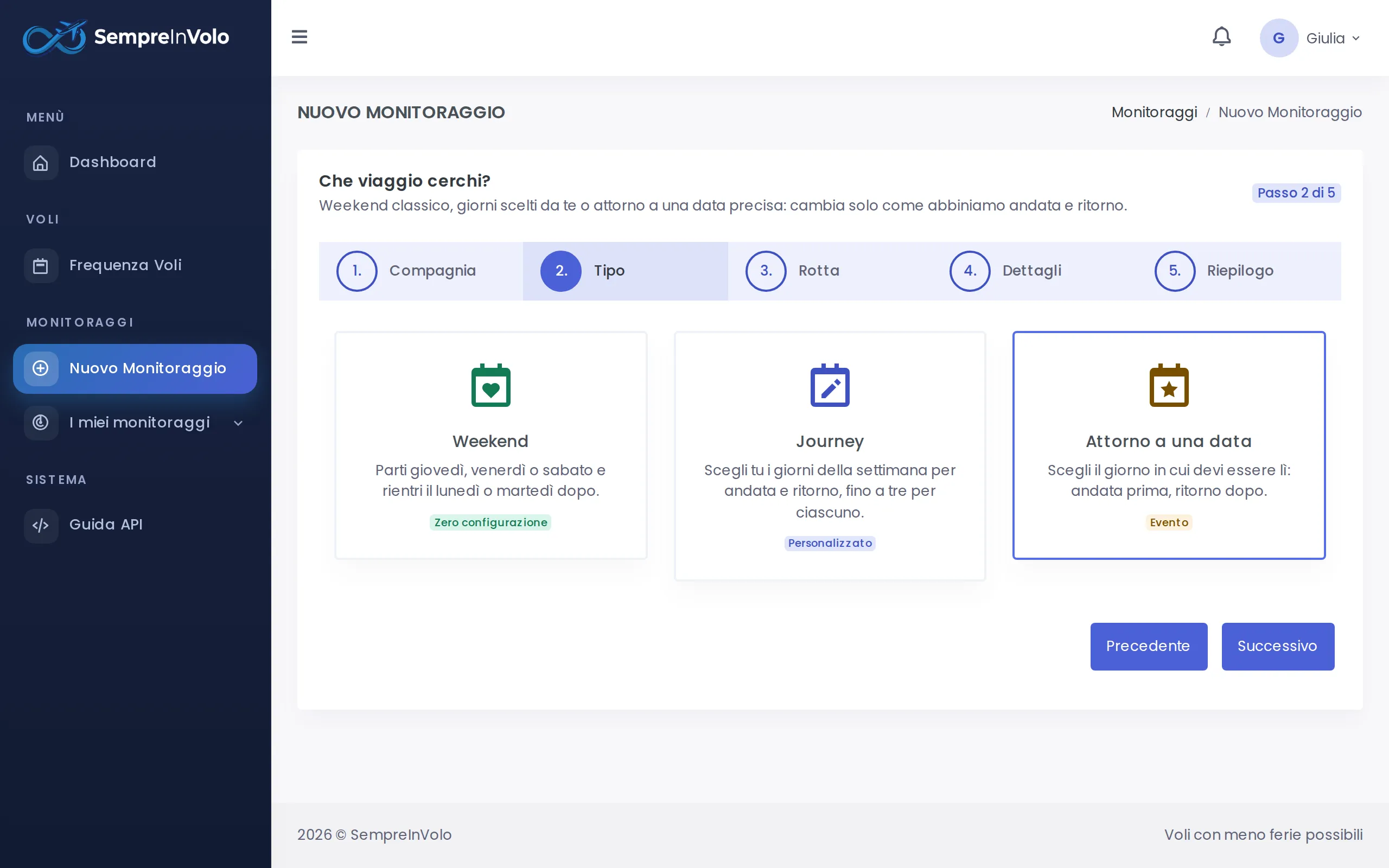
Three ways to search

A tracker for every kind of getaway

Only the way outbound and return are paired changes. Everything else, from the days-off count to alerts, works the same.

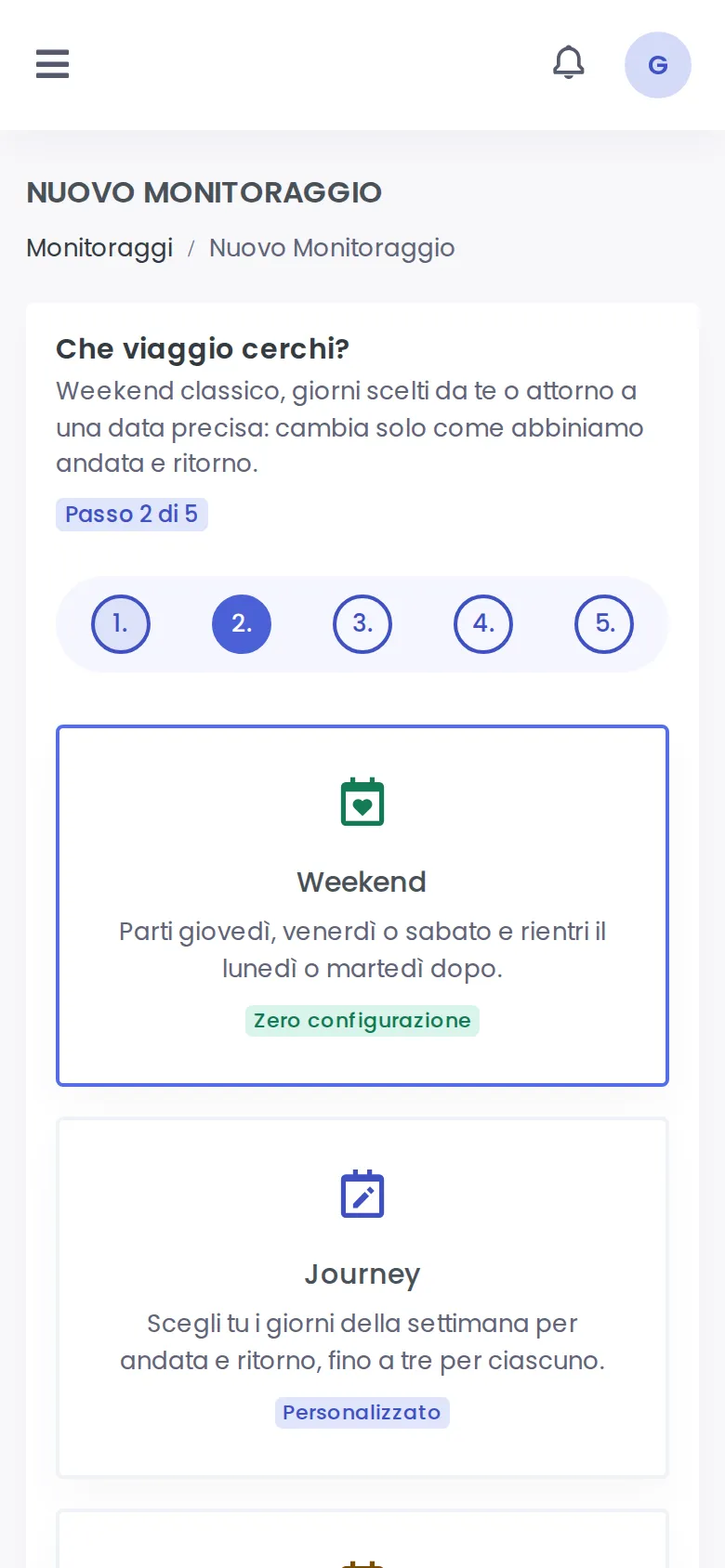
  • Zero setup

    Weekend

    Leave on Thursday, Friday or Saturday and come back the following Monday or Tuesday. The rule is fixed: you only pick the route.

    Outbound
    Thu · Fri · Sat
    Return
    Mon · Tue

    Best forLong weekends and bridge holidays

  • Your rules

    Custom

    Choose up to three weekdays to leave and up to three to come back. For every departure it finds the first useful return.

    Outbound
    Up to 3 days
    Return
    Up to 3 days

    Best forWeek-long trips or shift work

  • Event

    Around a date

    A wedding, a concert, an exam? Enter the event (1 to 5 days) and how many days before and after you are willing to fly.

    Outbound
    Up to 6 days before
    Return
    Up to 6 days after

    Best forEvents, visits, appointments

Choosing the tracker type in the SempreInVolo wizard (Desktop)
Desktop
Choosing the tracker type in the SempreInVolo wizard (Mobile)
Mobile

The days-off count

How many days off does that flight really cost?

A 2 pm Friday flight is not free: it costs you a working day. SempreInVolo looks at departure and arrival times, the working days in between and Italian public holidays, Easter Monday included. Try it here.

  • Leaving on a working day before 6 pm: counts as 1 day.
  • Landing on a working day after 9 am: counts as 1 day.
  • Every full working day spent away: counts as 1 day.
  • Saturdays, Sundays and public holidays are free.
Departure
Arrival home

Features

Everything you need to book at the right time

Real screenshots of the platform, on desktop and on mobile. The interface is in Italian.

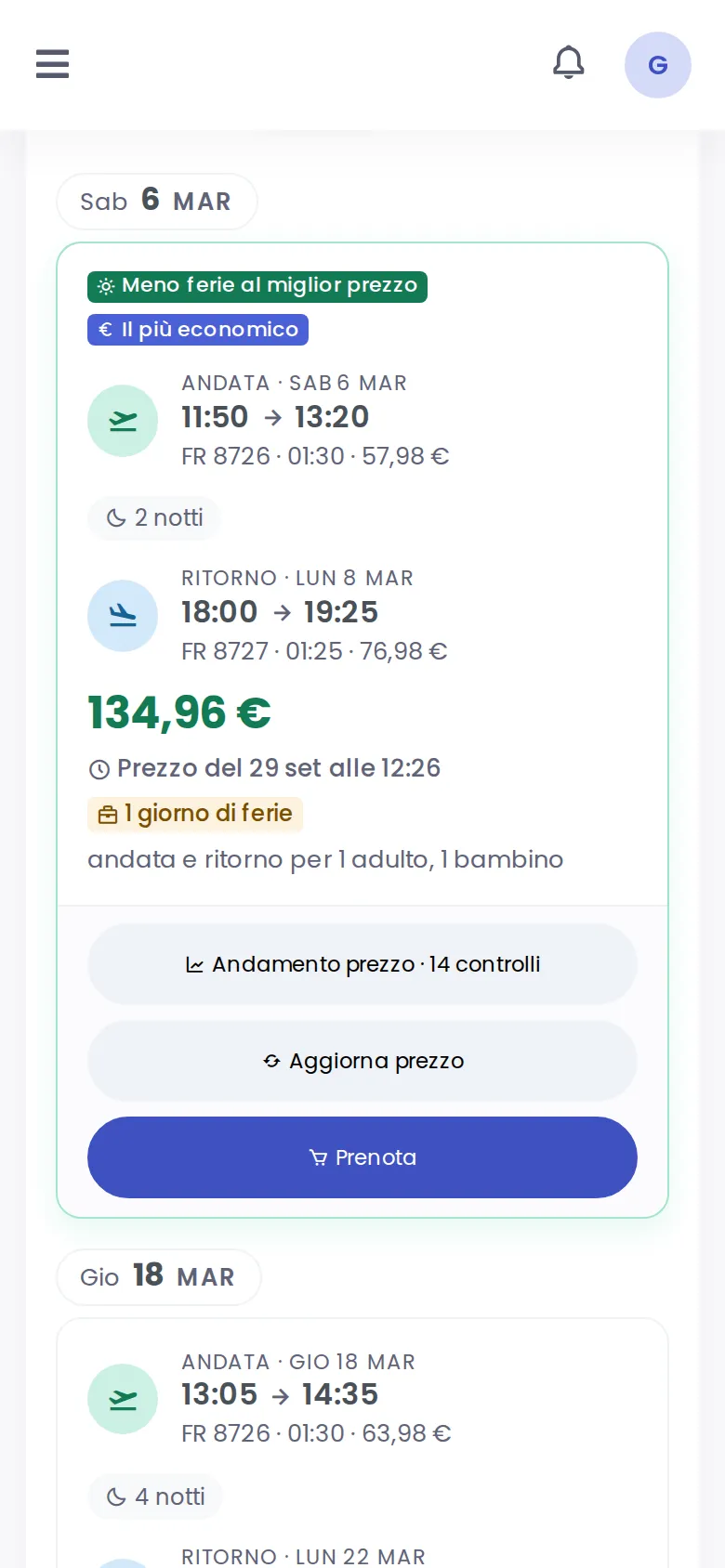
Every combination, sorted your way

Each pair of dates with times, flights, nights, total price and days off. Sort by date, price or days off, show only zero-days-off trips and book in one tap on the airline’s website.

  • Highlights: fewest days off, cheapest, soonest
  • All the flights of the day, not just the first one
  • Refresh the price of any combination on demand
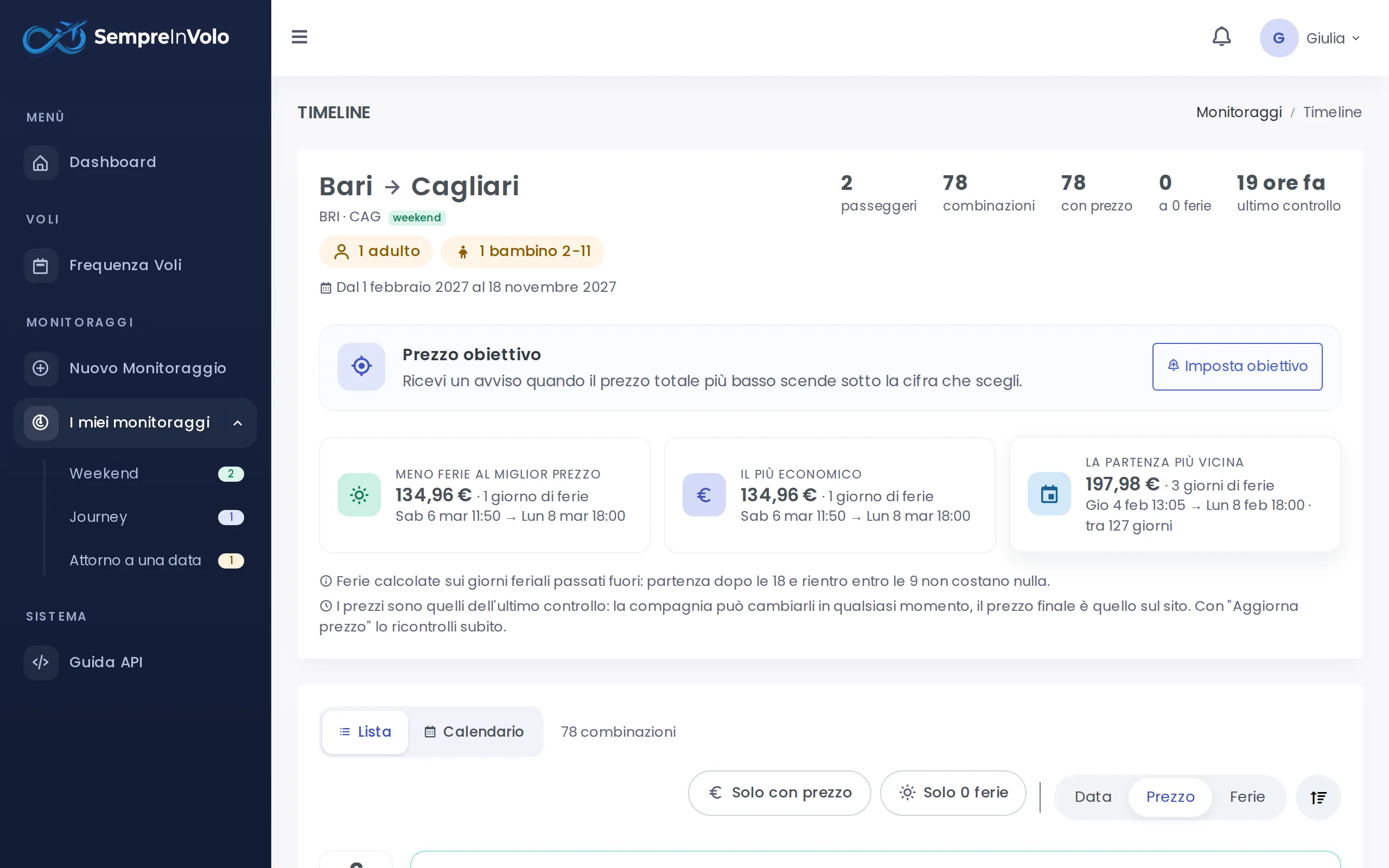
Timeline of flight combinations with prices and days off (Desktop)
Desktop
Timeline of flight combinations with prices and days off (Mobile)
Mobile

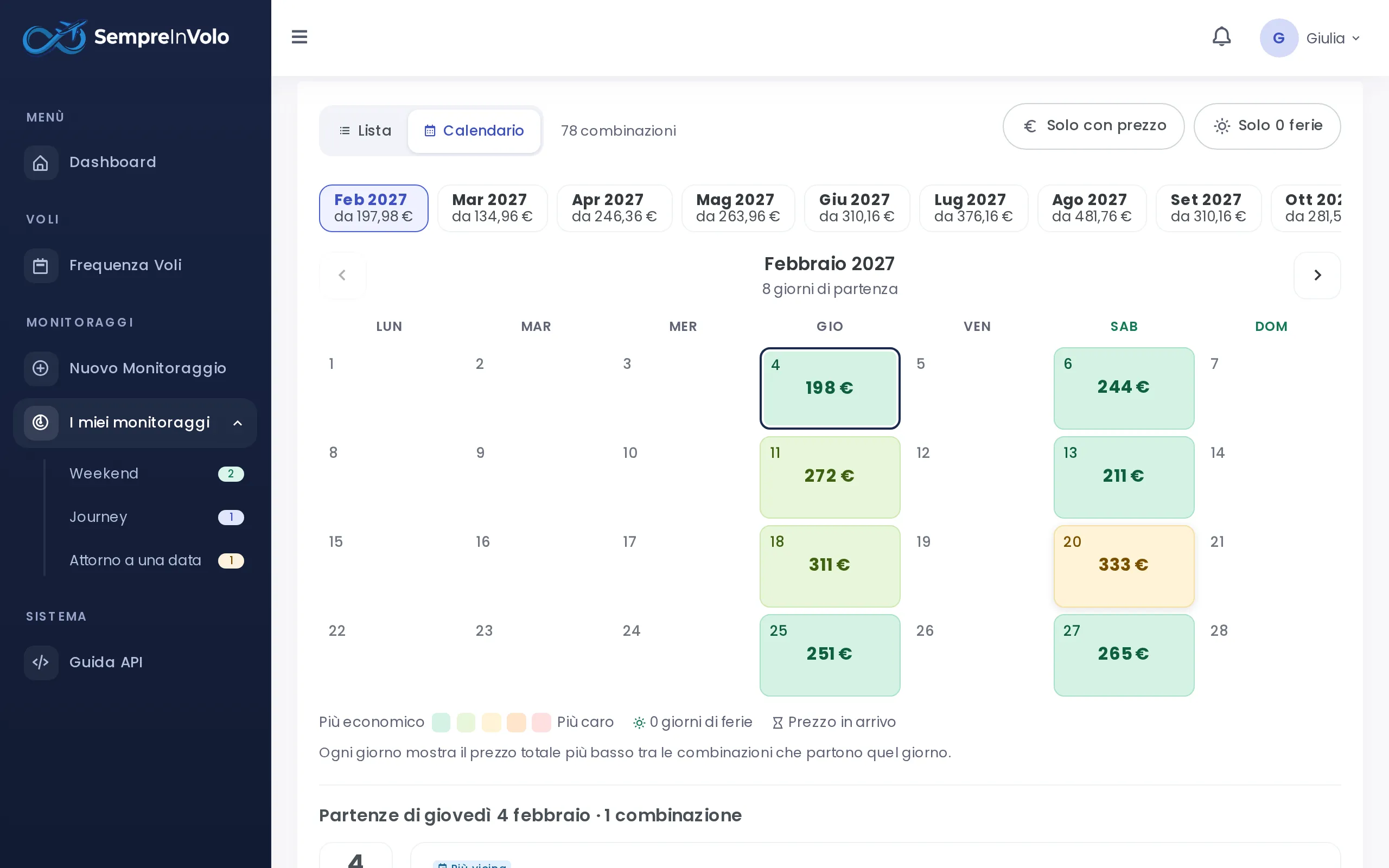
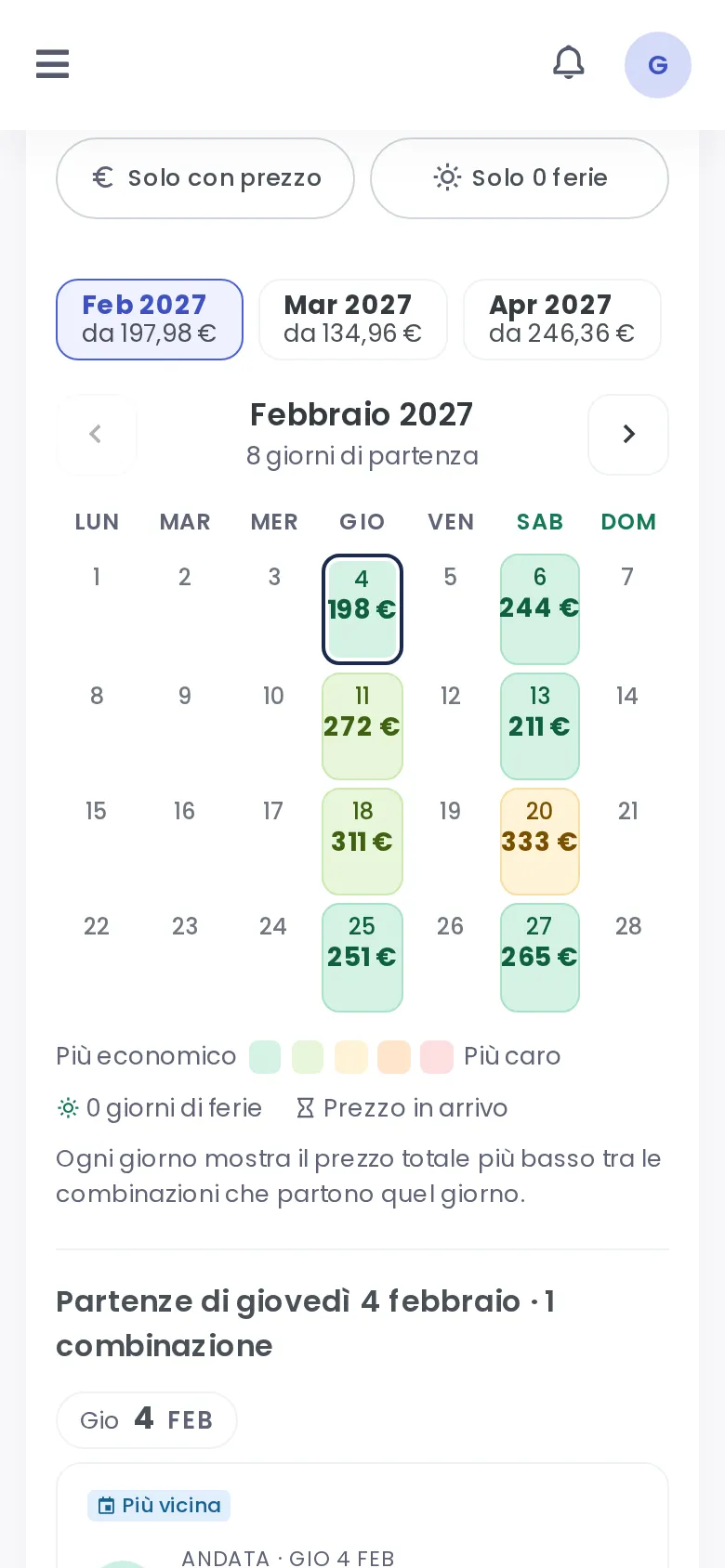
The price calendar at a glance

Switch to calendar view: each departure day shows its lowest price, coloured from cheapest to most expensive. Tap a day to see all its combinations.

  • Five price bands, always with the price written
  • Icons for zero-days-off trips and prices below target
  • Months with their lowest price already worked out
Calendar view with the lowest price of each departure day (Desktop)
Desktop
Calendar view with the lowest price of each departure day (Mobile)
Mobile

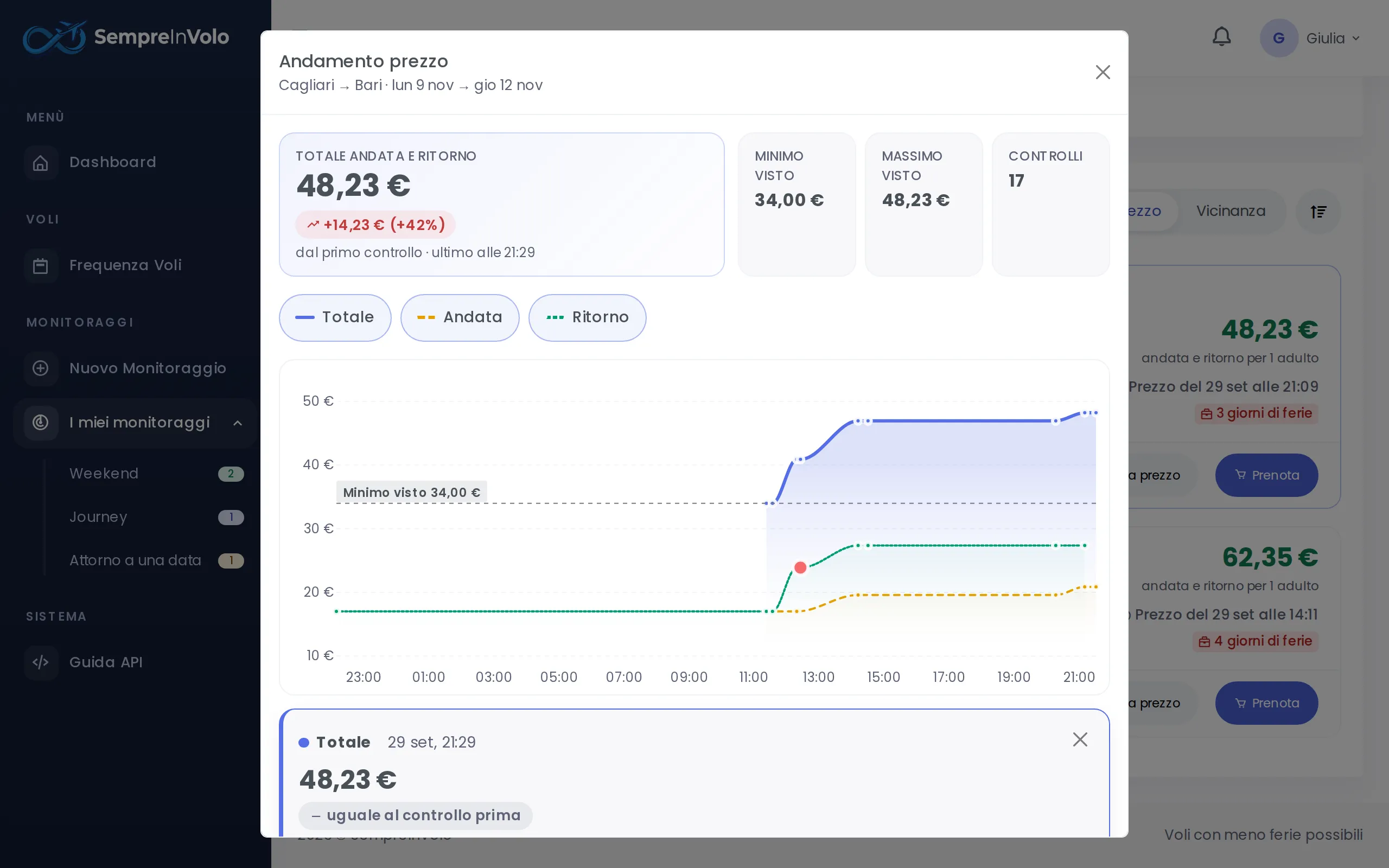
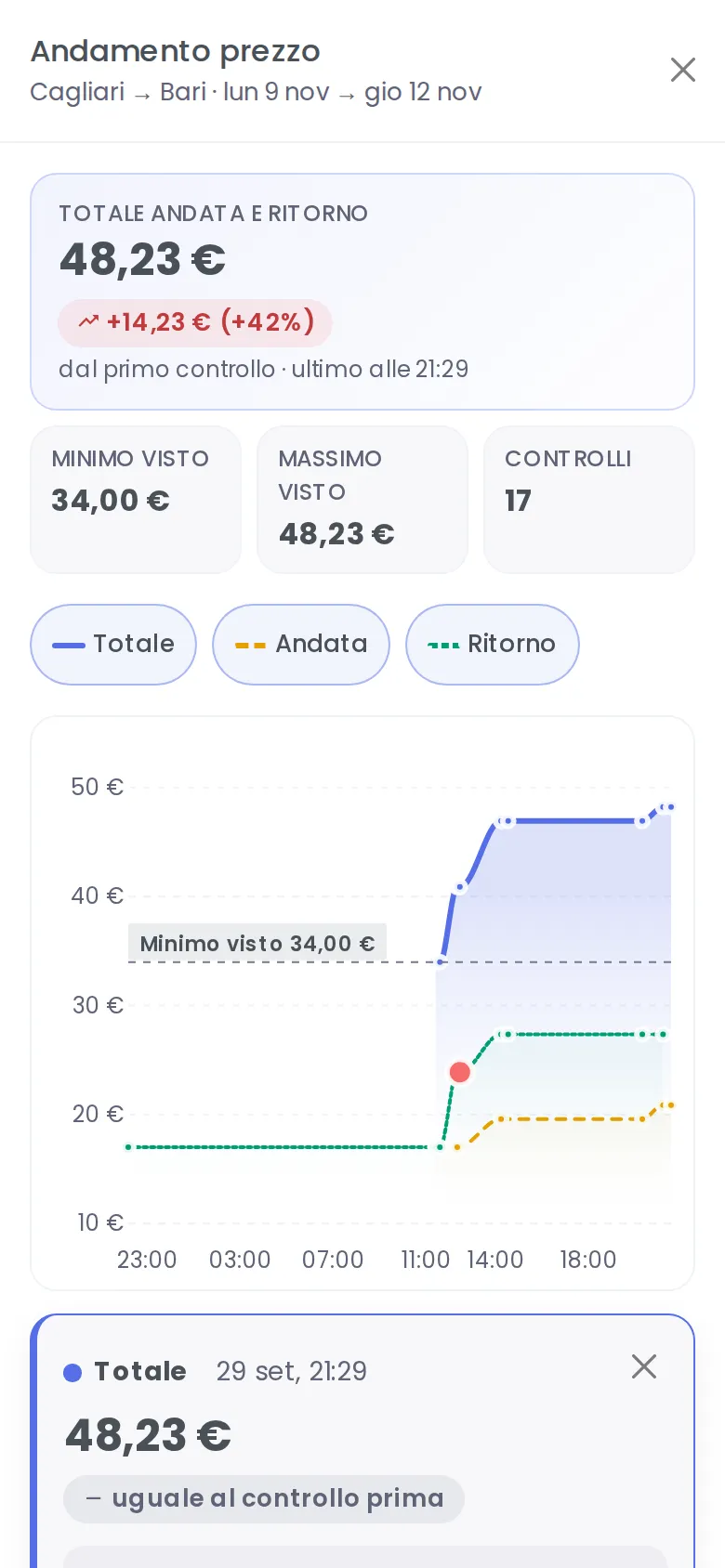
The history of every price

Every check is saved. See how the outbound, return and total prices moved, how many seats were left at that fare and how many days were left before departure.

  • Lowest and highest seen, change since the first check
  • Red dots when only 1-3 seats were left
  • Switch flights and compare times on the same day
Chart of outbound, return and total price over time (Desktop)
Desktop
Chart of outbound, return and total price over time (Mobile)
Mobile

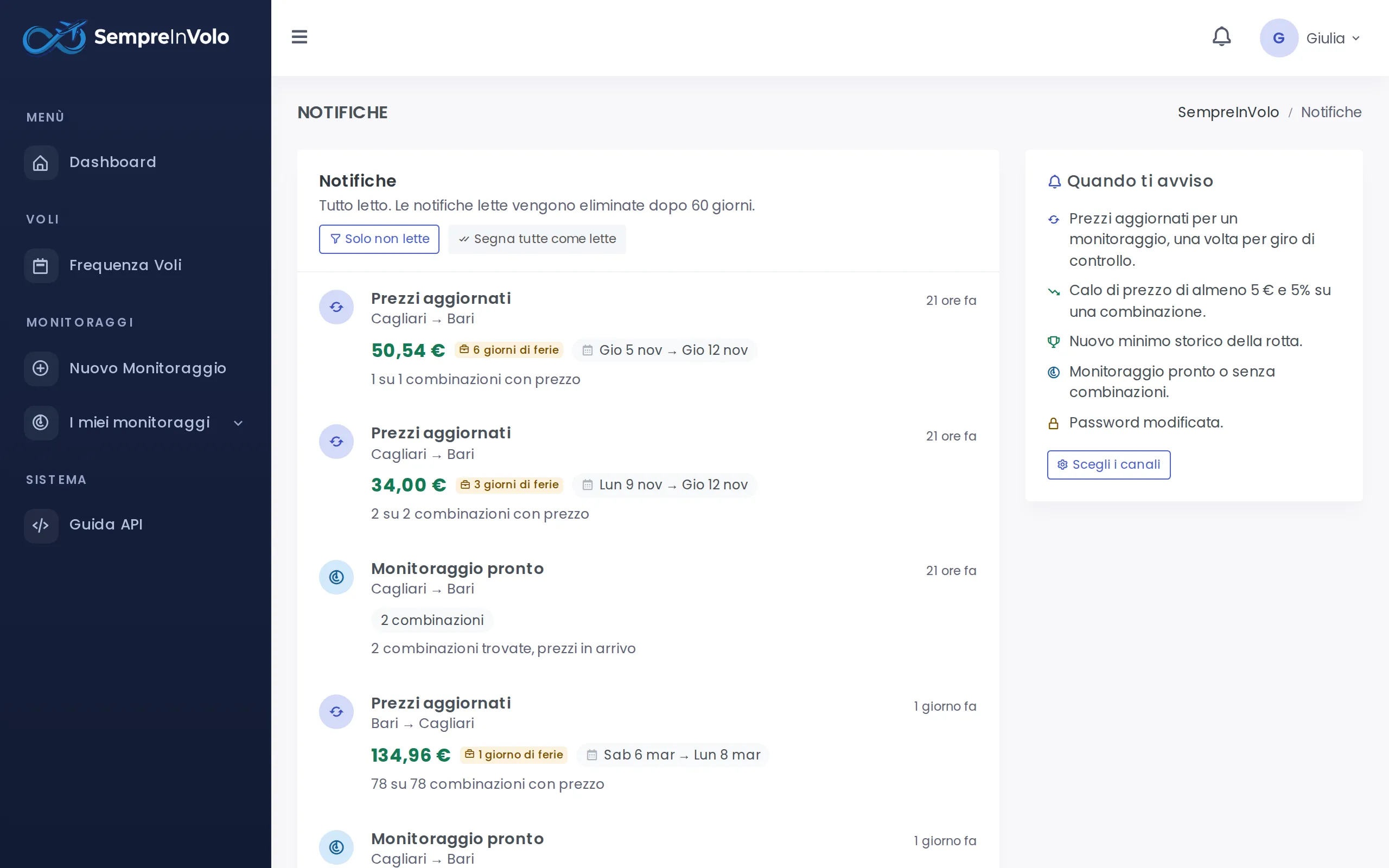
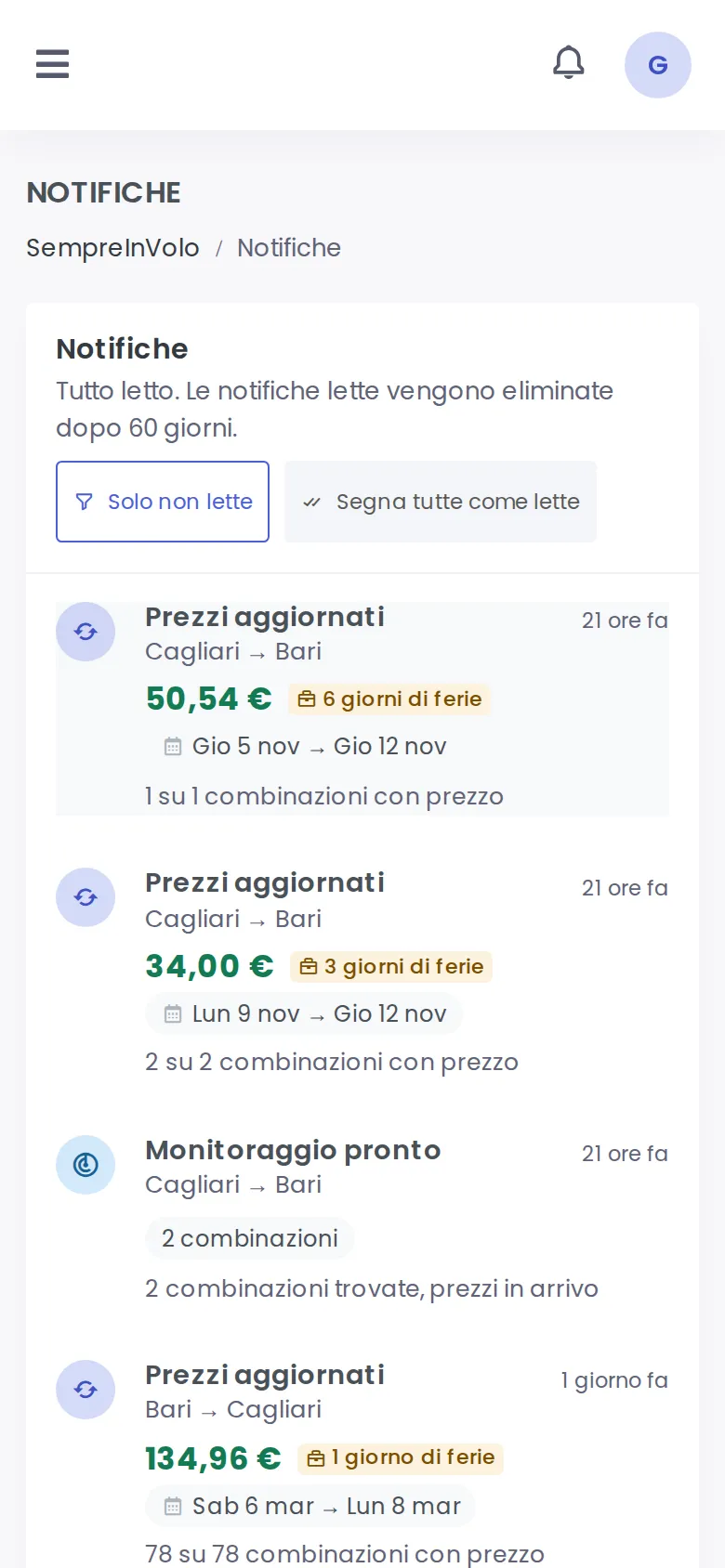
Alerts that matter, no noise

We only write when it matters: a drop of at least €5 and 5%, a new all-time low, your target price reached, new dates on sale. In the app, by email or as a push notification on your phone.

  • Target price: one alert, then it re-arms itself
  • A new low for each number of days off
  • You choose the channels, one by one
List of price drop and new low notifications (Desktop)
Desktop
List of price drop and new low notifications (Mobile)
Mobile

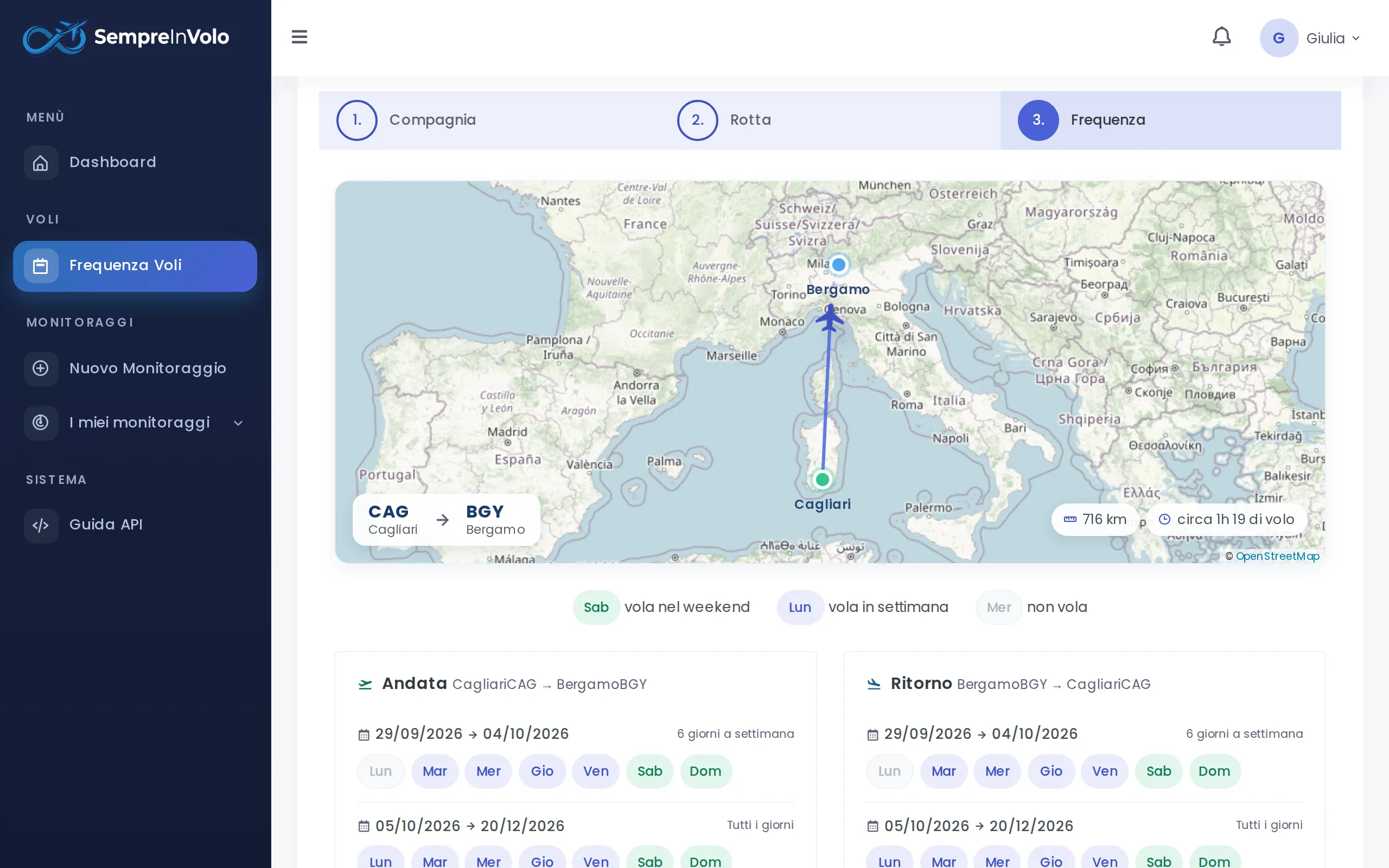
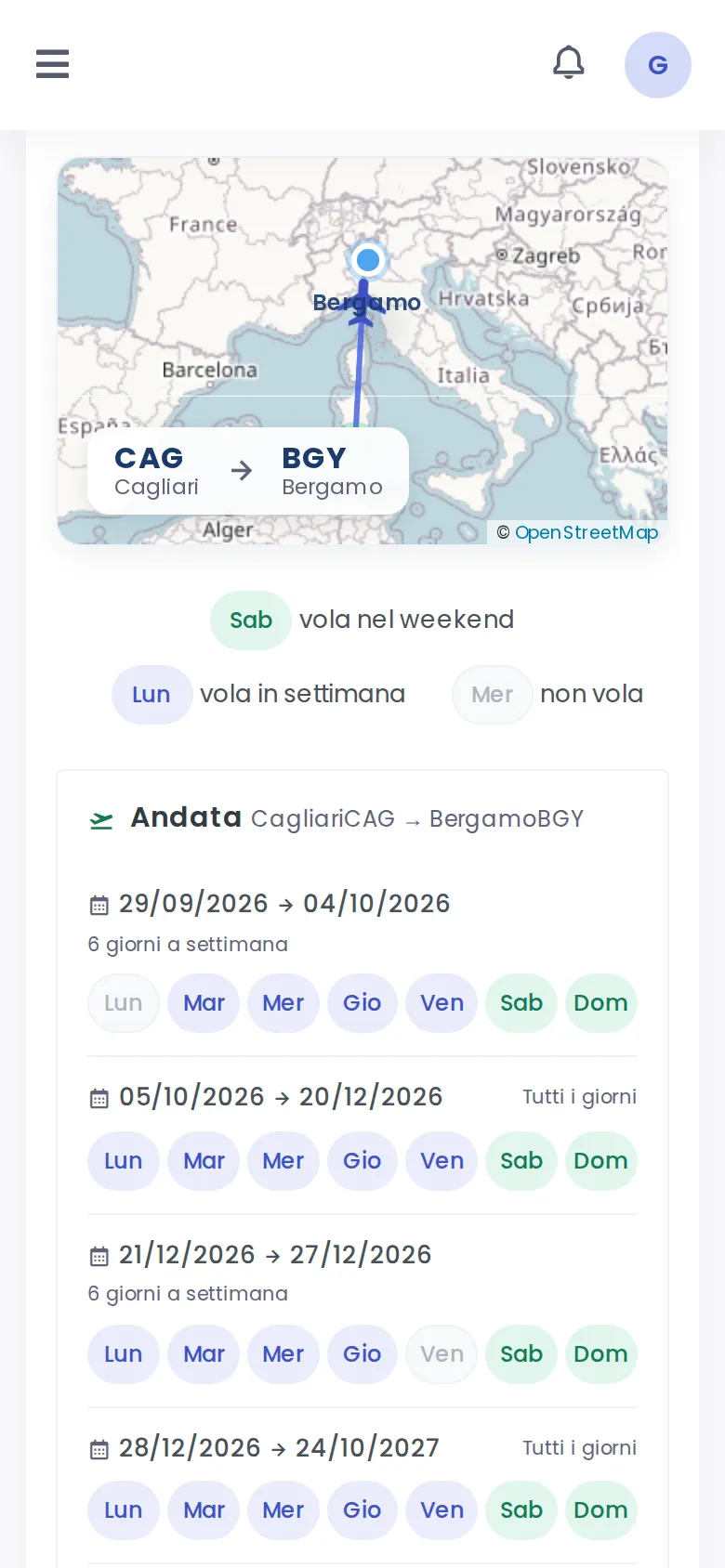
Which days a route really flies

Before planning, find out when a route is operated: periods, weekdays, seasonal breaks, distance and estimated flight time, on the map.

  • Compact periods: “from … to …, flies Fri and Mon”
  • Weekends highlighted in green
  • One tap to track that route
Route map and the weekdays the route is operated (Desktop)
Desktop
Route map and the weekdays the route is operated (Mobile)
Mobile

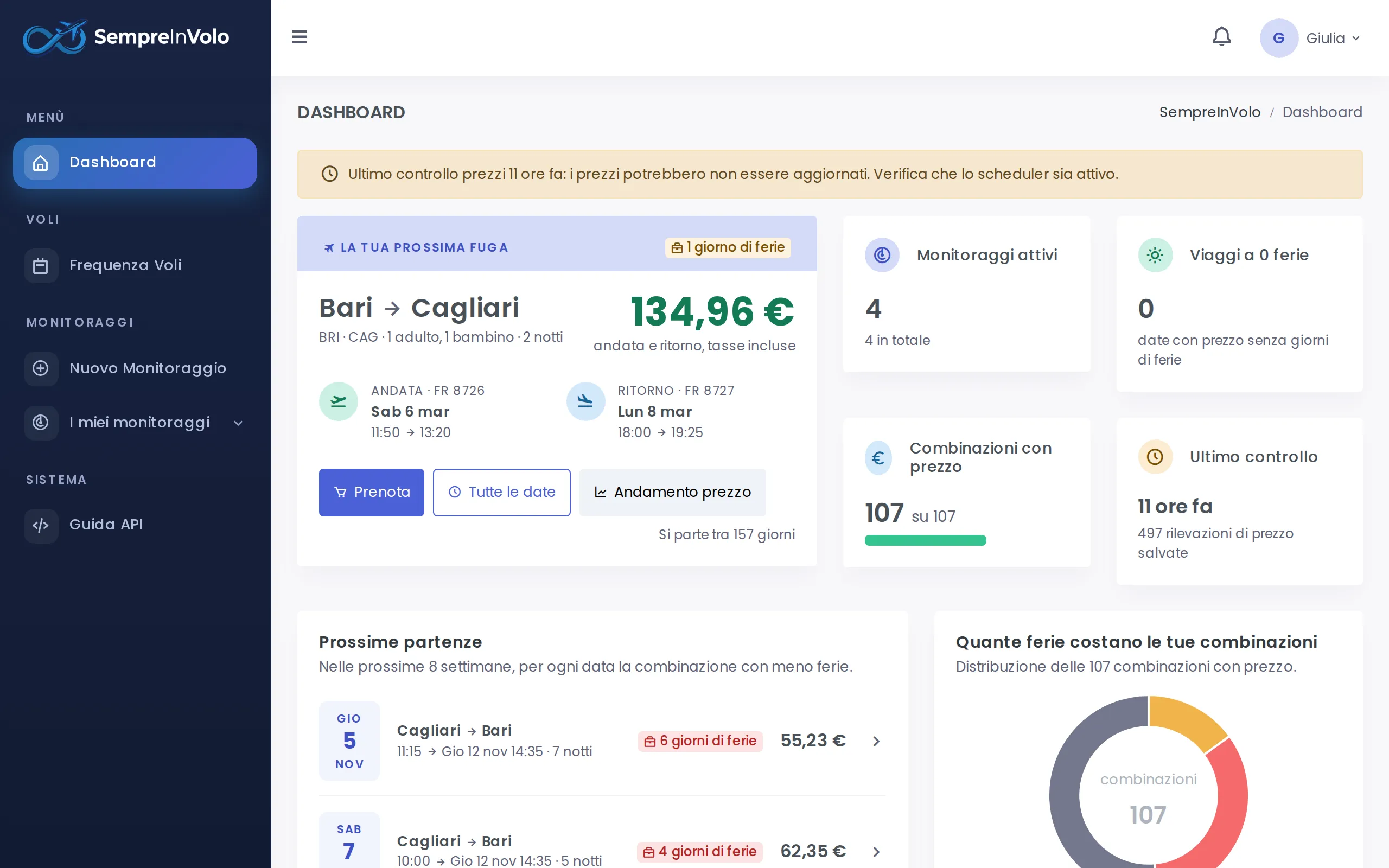
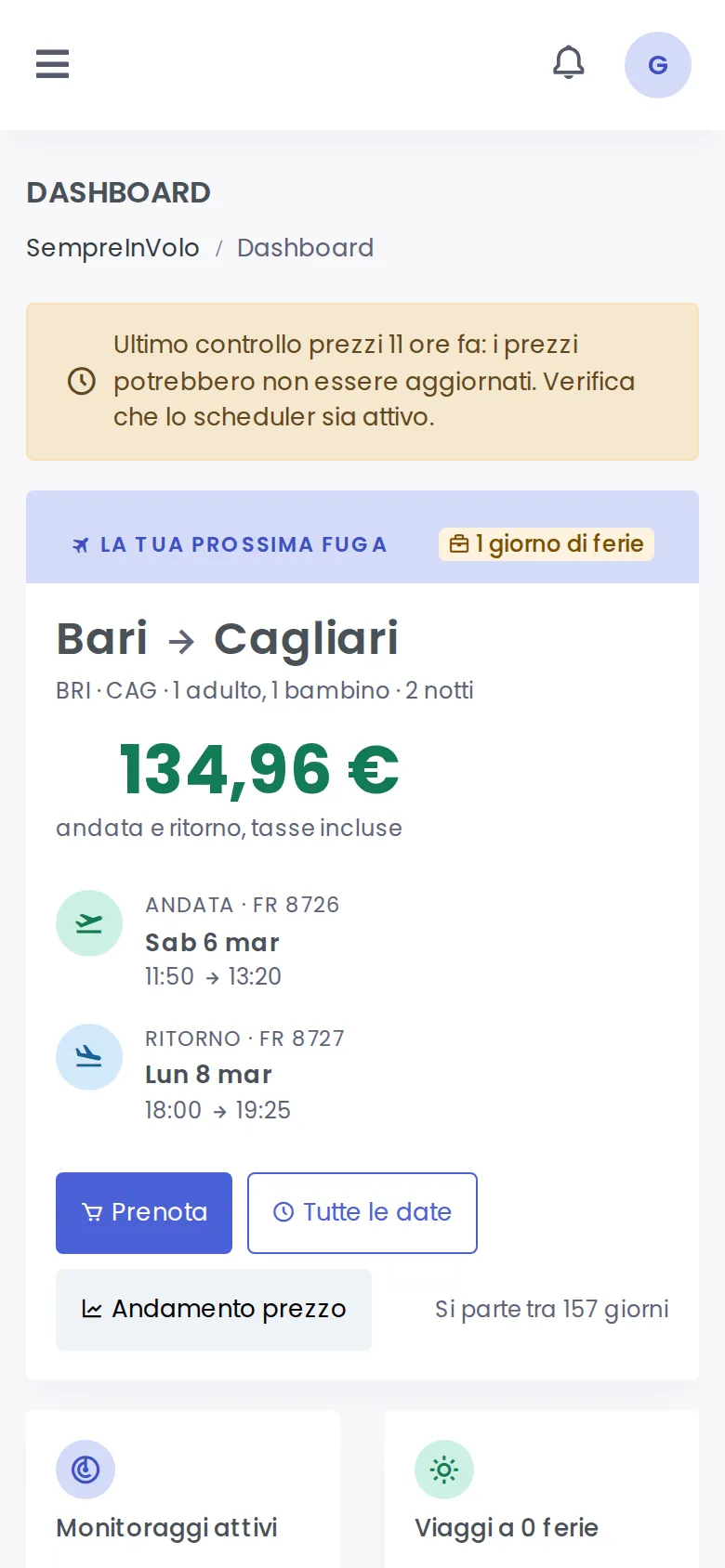
Your next getaway, ready to go

The dashboard brings every route together: the trip with the fewest days off at the best price, upcoming departures, how many days off your trips cost and how prices move.

  • Status of every tracker at a glance
  • Combinations grouped by days off
  • Price trend of your next departure
Dashboard with the recommended next getaway and statistics (Desktop)
Desktop
Dashboard with the recommended next getaway and statistics (Mobile)
Mobile

Plus all the details that make the difference

  • Last seats

    When only 1-3 seats are left at a fare you see it straight away, and that combination is re-checked after 30 minutes instead of 3 hours.

  • Sold out and cancelled

    A sold-out or no longer bookable flight drops out of the prices on its own, and comes back when sales reopen.

  • New dates, automatically

    The calendar is re-read every night: new dates join the tracker, removed ones leave it.

  • Italian public holidays

    New Year’s Day, 25 April, 2 June, Ferragosto, Easter Monday and all the others cost no days off.

  • Installs like an app

    Add SempreInVolo to your Home screen: it opens full screen and receives push notifications.

  • Developer API

    REST API documented with OpenAPI, to take your trackers wherever you want.

The comparison

Not just another flight search engine

Classic search engine
One pair of dates at a timeEvery date on sale, in one go
Today’s priceThe history of every check
You count the days offDays off worked out from times and holidays
You have to check againIt alerts you when the price drops
Every search starts from scratchTrackers stay active and update themselves

Why it exists

Born from a simple question

How many long weekends can I take this year with the days off I have?

No travel site could answer. You always search from a date, never from your free days. SempreInVolo was built to flip that around: you say where you want to go and it shows you when it pays off, in euros and in days off.

FAQ

Before take-off

Is SempreInVolo free?

Yes. Sign up with your email and a password and create your trackers at no cost, with no credit card.

Can I book directly on SempreInVolo?

No, SempreInVolo does not sell tickets. Every combination links straight to the airline’s booking page with dates and passengers already filled in. The final price is always the one shown on the airline’s website.

Which flights does it search?

Today SempreInVolo works with the flights of one of Europe’s leading low-cost airlines: more than 220 airports and over 5,000 routes, from Italy to the whole of Europe, North Africa and the Middle East.

How are days off counted?

Leaving on a working day before 6 pm counts as one day, landing on a working day after 9 am counts as one day, and every full working day spent away counts as one day. Saturdays, Sundays and Italian public holidays, Easter Monday included, are free.

How often are prices updated?

Each combination is re-checked about every 3 hours, and after 30 minutes when only a few seats are left at that fare. You can also refresh a combination’s price by hand.

How do I get alerts?

In the app’s bell, by email and as push notifications on your phone or computer. You choose which channels to turn on from your profile.

Do I need to download an app?

No. SempreInVolo works in the browser, on computers and smartphones. If you like, you can install it on your Home screen like an app, without going through the app stores.

Is the price shown guaranteed?

No: it is the price found at the last check, with its time shown next to it. Airlines can change it at any moment, which is why SempreInVolo shows when it was found and how many seats were left.

Ready for take-off?

Create your first tracker: in two minutes SempreInVolo starts looking for the best dates for you.